
Life doesn’t always follow a schedule and sometimes the date you booked for your PSA visit simply no longer works. Whether an emergency came up, your work schedule shifted, or you realized you haven’t gathered all your requirements yet, missing a confirmed PSA appointment without doing anything about it is a waste of a slot that someone else could have used. The good news is that rescheduling a psa appointment online or any other civil registry appointment is easier than most people expect and in most cases, you don’t even need to cancel and rebook from scratch.
This complete guide covers every method available in 2026 to reschedule your PSA online appointment, what happens if you miss it without rescheduling, important rules to keep in mind, and how to book a fresh appointment if your original slot needs to be cancelled entirely.
What Is the PSA Online Appointment System?
Before diving into how to reschedule, a quick overview of the system itself helps set the right context.
The PSA Online Appointment System is a web-based platform that allows individuals to book a schedule to visit any PSA outlet across the Philippines. It was launched to help manage foot traffic at PSA offices, ensure social distancing, reduce waiting times, and improve the overall experience for document requesters. Instead of taking a chance at being accommodated at a PSA office, you now choose your preferred PSA location, date, and time for your visit. Once your appointment is confirmed, you will receive an appointment slip, which you must bring with you on the day of your visit.
Without a confirmed appointment, entry is not permitted the agency enforces a strict no-appointment, no-entry policy at all locations nationwide. This means that if your schedule changes, you cannot simply show up on a different day. You must either reschedule your existing slot or cancel and book a new one.
The official PSA Online Appointment System operates at psa online appointment, the only government-authorized portal for this service.
Can You Reschedule a PSA Appointment Directly?
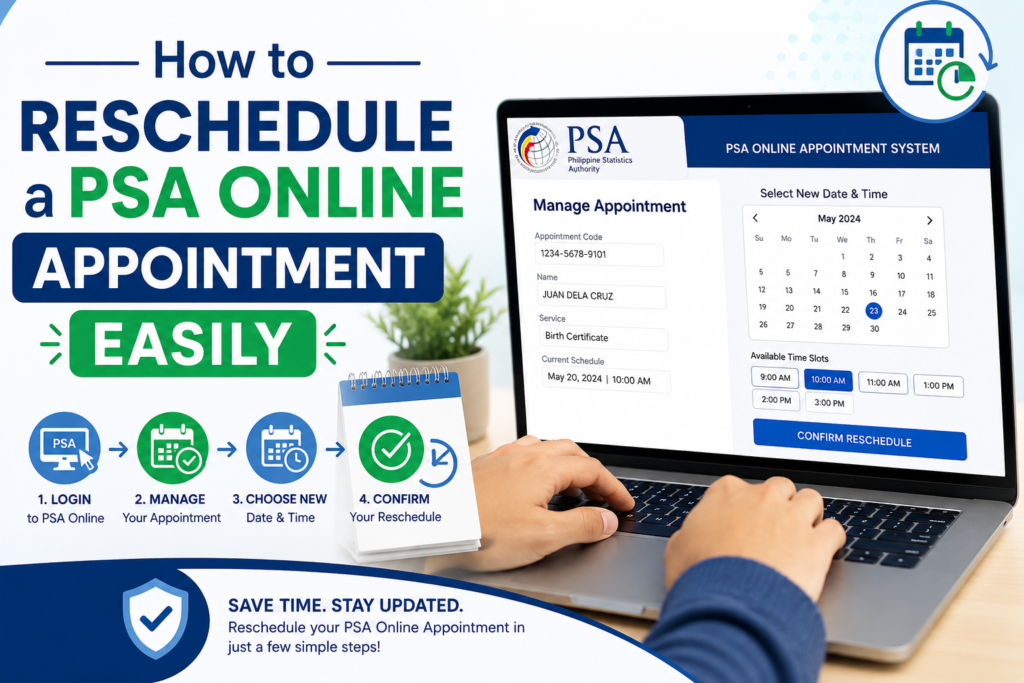
Yes and the process has been significantly improved in 2026. If you cannot go to your PSA appointment on the day you picked, you can reschedule it easily. You do not have to cancel and rebook. The PSA now lets you change the date and time right from your confirmation email.
This is an important update from earlier versions of the system where rescheduling required a full cancellation and rebooking. If you’re unable to attend your scheduled PSA appointment, there’s no need to cancel and start over. The system now allows you to reschedule easily through your confirmation email.
Method 1: Reschedule via Your Confirmation Email (Recommended)
This is the fastest, easiest, and most reliable method. When you originally booked your appointment, PSA sent a confirmation email containing your appointment details, QR code, and management links. That email is your primary tool for rescheduling.
Step-by-Step: Reschedule via Email
Just follow these steps carefully to reschedule your appointment: After booking your PSA appointment, check your email inbox. You will find a confirmation email from PSA. Open that email, and look for a black “Reschedule” button, which is mostly below your appointment details. Click the “Reschedule” button.
Here is the complete process:
Step 1: Find your PSA confirmation email Open your email inbox and search for the original booking confirmation from PSA. It was sent to the email address you registered when booking the appointment. If you cannot find it in your inbox, check your spam or junk folder.
Step 2: Click the “Reschedule” button A message will pop up asking, “Are you sure you want to reschedule your appointment?” Click “Yes” to continue.
Step 3: Select a new date and time. A calendar will appear. Choose your preferred date and available time slot, then click “Next.” Available dates will be highlighted grayed-out dates have no open slots. Select any open date that works for you, then choose from the available time slots for that day.
Step 4: Review your new appointment details Review your details: Double-check that your name, branch, date, and time are correct. Once verified, click “Confirm.”
Step 5: Receive your updated appointment slip You’ll receive a new confirmation email containing your revised appointment slip and QR code. On the day of your visit, show this updated slip printed or saved on your phone when you arrive at the PSA office.
Important: Once you reschedule, your original appointment date and time are released back into the system. You cannot revert to your old slot only if your new rescheduled appointment is valid.
Method 2: Reschedule via the PSA CRS Appointment Portal
If you cannot find your original confirmation email or the reschedule button is not visible, you can manage your appointment directly through the online portal using your reference number.
Step-by-Step:
- Go to psa online appointment in your browser
- Look for the “Manage Appointment” or “Existing Appointment” section on the homepage
- Enter your appointment reference number this was included in your original confirmation email and SMS
- Enter the email address you used when booking
- Click “View Appointment” to retrieve your booking details
- Select the “Reschedule” option from the available management actions
- Choose a new date and available time slot from the calendar
- Confirm your selection and wait for the updated confirmation email with your new appointment slip and QR code
You can log in to the PSA website using your reference number to reschedule or cancel your appointment. Follow the prompts to complete the process.
Method 3: Cancel and Rebook (If Reschedule Is Unavailable)
In some cases particularly for older bookings made before the reschedule feature was introduced, or if the system encounters a technical issue the reschedule option may not be available for your specific appointment. In this situation, you will need to cancel your existing booking and create a new one.
How to Cancel an Existing Appointment
Rescheduling is not directly available through the portal in all cases. You must cancel your existing appointment and rebook a new slot. The cancellation process is done through the same official website.
- Go to your original confirmation email and click the “Cancel Appointment” link
- Confirm the cancellation when prompted
- If you’re unable to attend but still wish to visit the PSA office, consider changing your appointment date instead of canceling it entirely. Follow steps 1 through 4 from the cancellation process. Instead of selecting “Cancel Appointment,” look for an option that says “Reschedule” or “Change Date.” Choose a new date and time from the available options. Confirm your new appointment details and check for a confirmation email.
How to Book a New Appointment After Cancellation
Once your original appointment is cancelled, follow these steps to book a fresh slot:
- Go to psa online appointment
- Click “Book an Appointment”
- Select your preferred PSA CRS outlet or Serbilis center
- Choose the document type you need (birth certificate, marriage certificate, CENOMAR, death certificate, etc.)
- Select your preferred date and time from available slots
- Enter your personal details full name, contact number, and email address
- Complete the CAPTCHA verification
- Click “Confirm Booking”
- Check your email for the new confirmation slip and QR code
Booking tip: Available appointment slots fill up quickly especially during peak periods like April through June (school enrollment season). Book your rescheduled appointment as soon as your original is cancelled to secure the earliest available date.
Key Rules and Policies for PSA Appointment Rescheduling

Before rescheduling, familiarize yourself with these important PSA appointment rules to avoid complications.
Slots Are Subject to Availability
You can only reschedule if slots are available. Contact the PSA office directly to request a new appointment date. If all available dates at your preferred outlet are fully booked, you may need to either wait for new slots to open up or choose a different PSA outlet.
Appointments Are Non-Transferable
Appointments cannot be transferred: you must use your own name when booking. You cannot give your appointment slot to someone else. If you rescheduled to a date that also no longer works, you will need to repeat the rescheduling process.
Minors Need Adult Assistance
Minors usually cannot book appointments themselves. An adult must handle the process. If you are booking or rescheduling on behalf of a minor child, ensure an authorized adult accompanies the child on the new appointment date.
No Walk-Ins Are Allowed
The agency enforces a strict no-appointment, no-entry policy at all locations nationwide. Even if you missed your original slot, you cannot simply walk into the PSA outlet without a confirmed rescheduled appointment. Reschedule first, then visit.
Priority Lanes for Special Cases
Many PSA offices have priority lanes for those who qualify. Indicate your status when booking to access these lanes. Senior citizens, pregnant women, and persons with disabilities are entitled to priority lane service make sure to indicate this status when booking your new appointment to be directed to the appropriate lane upon arrival.
What Happens If You Miss a PSA Appointment Without Rescheduling?
Missing a confirmed PSA appointment without cancelling or rescheduling does not result in a fine or ban but it does mean your slot is wasted. The PSA will not automatically offer you a replacement slot. You will need to go back to the appointment portal and book a new one from scratch.
If you know in advance that you cannot make your scheduled appointment, always reschedule or cancel as early as possible. This frees up your slot for another applicant and keeps the system running efficiently for everyone.
What to Bring on Your Rescheduled PSA Appointment Day
Once your new appointment is confirmed, prepare the following before your visit to ensure a smooth transaction:
For all PSA appointments:
- Your updated appointment slip printed or saved digitally on your phone (the new QR code from the rescheduled confirmation email)
- One valid government-issued ID (original and one photocopy)
- Payment in cash ₱155 per copy for birth certificates, marriage certificates, death certificates; ₱210 per copy for CENOMAR
For third-party requests (requesting on behalf of a family member):
- A signed authorization letter from the document owner
- A photocopy of the document owner’s valid ID
- Your own valid ID
Important: Present only the QR code from your most recent (rescheduled) confirmation email. Your original appointment slip is no longer valid after rescheduling.
How to Book a Fresh PSA Online Appointment for a Birth Certificate
If you are booking a brand-new online appointment PSA slot whether after cancelling an old one or as a first-time booking here is the complete step-by-step process for 2026.
- Go to the official PSA appointment system at psa online appointment
- Click “Book an Appointment” from the homepage
- Select the region where your preferred PSA outlet is located
- Choose your preferred PSA CRS outlet from the list of available locations in your region
- Select the type of document you need:
- Birth Certificate
- Marriage Certificate
- Death Certificate
- CENOMAR (Certificate of No Marriage)
- Choose whether you are requesting for yourself or on behalf of someone else
- Select your preferred appointment date from the calendar available dates are highlighted; fully booked dates are grayed out
- Choose a time slot from the available options for your selected date
- Enter your personal details:
- Full legal name
- Mobile number
- Email address
- Review all details carefully, complete the CAPTCHA, and click “Confirm Booking”
- Check your registered email for your appointment confirmation slip containing your QR code and appointment reference number
- Save the QR code to your phone or print it out you will need to present it at the PSA outlet
Booking a slot is completely free. You pay only the certificate fee when you arrive at the PSA outlet on your scheduled date.
Tips for Securing a PSA Appointment Slot Quickly
PSA appointment slots particularly at popular outlets in Metro Manila can fill up within hours of becoming available. These strategies improve your chances of securing a slot at your preferred location and date, especially if you’re going through the PSA appointment for passport process.
Check the portal early in the morning. New appointment slots are typically released at the start of each business day. Logging on to psa online appointment early in the morning gives you the best chance of finding available slots before they are taken.
Try multiple outlet locations. If your nearest PSA outlet is fully booked, check neighboring outlets in adjacent cities or municipalities. The appointment system covers all PSA CRS outlets nationwide, and less central locations often have more available slots.
Consider weekday slots over weekends. Many applicants prefer weekend appointments, making weekday slots especially Tuesday and Wednesday mornings easier to secure and faster to process on the day.
Set a browser reminder. If all slots are currently booked, check the portal again in a few days. Cancellations by other applicants free up previously booked slots, and these appear in the calendar in real time.
Common Problems When Rescheduling a PSA Appointment
Cannot Find the Original Confirmation Email
If you cannot find your PSA booking confirmation, check:
- Spam or junk folder in your email
- Other email addresses you may have used during booking
- Any SMS sent to your registered mobile number, which also contains appointment details
If the email is permanently lost, try logging into the appointment portal at psa online appointment using your reference number. For common problems and how to address them: Website Downtime: Sometimes, the PSA website may be down for maintenance. If this happens, try again later or use their customer service hotline.
Reschedule Button Not Appearing in the Email
If the reschedule button does not appear in your confirmation email, try:
- Opening the email on a desktop browser instead of a mobile email app some apps do not render HTML buttons correctly
- Forwarding the email to yourself and opening the forwarded version
- Going directly to psa online appointment and using the “Manage Appointment” option with your reference number
No Available Slots at Preferred Outlet
You can only reschedule if slots are available. Contact the PSA office directly to request a new appointment date. Try selecting a different PSA outlet or checking back in a few days for newly released or cancelled slots.
System Error During Rescheduling
If the portal returns an error during rescheduling, do not attempt to rebook immediately; your original appointment may still be active. Wait a few minutes, clear your browser cache, and try again.
Frequently Asked Questions
Can I reschedule a PSA appointment more than once?
Yes there is no stated limit on the number of times you can reschedule an appointment, as long as available slots exist. However, repeatedly rescheduling without attending wastes public resources and delays others. Reschedule only when genuinely necessary.
Can I change my PSA outlet when rescheduling?
The standard reschedule function changes the date and time at your originally selected outlet. To change to a different outlet, you will need to cancel your existing appointment and book a new one at the preferred location.
What if I missed my appointment and did not reschedule in advance?
Your missed appointment slot expires automatically. You will need to book a new appointment through the PSA appointment portal from the beginning. There is no penalty, but the slot is not automatically replaced.
Is the PSA Online Appointment System free to use?
Booking a slot is completely free. You pay only the certificate fee when you arrive at the PSA outlet on your scheduled date. Any third-party website that charges a booking fee for PSA appointments is unauthorized to always use the official portal at psa online appointment.
Final Thoughts
Rescheduling a PSA online appointment in 2026 has never been simpler: a single click on the reschedule button in your confirmation email, a new date selection from the calendar, and a fresh confirmation slip sent straight to your inbox. The process takes under five minutes and eliminates the need to start your booking from scratch. The key habits that keep the process smooth are: saving your confirmation email immediately after booking, checking the portal early when looking for new slots, and rescheduling as soon as you know your original date will not work, not at the last minute. With these practices in place, a schedule change becomes a minor two-minute task rather than a stressful scramble. And if appointment slots are fully booked at every outlet near you, remember that PSAHelpLine’s online ordering service is always available with no appointment, no queue, and delivery straight to your door.