










You’re about to see the easiest guide on How to Get SSS ID, including the exact requirements, updated steps, hotline numbers, and processing times. Everything is organized so you can complete your application smoothly and confidently. This guide removes stress and gives you a direct, friendly path from “new member” to “SSS ID holder.”
Quick Answer: Fastest Way to Get Your SSS ID
If you want the fastest way, schedule an SSS branch appointment, bring one primary ID, print your UMID form, and complete biometric capture. That’s it — the simplest path on How to Get SSS ID.
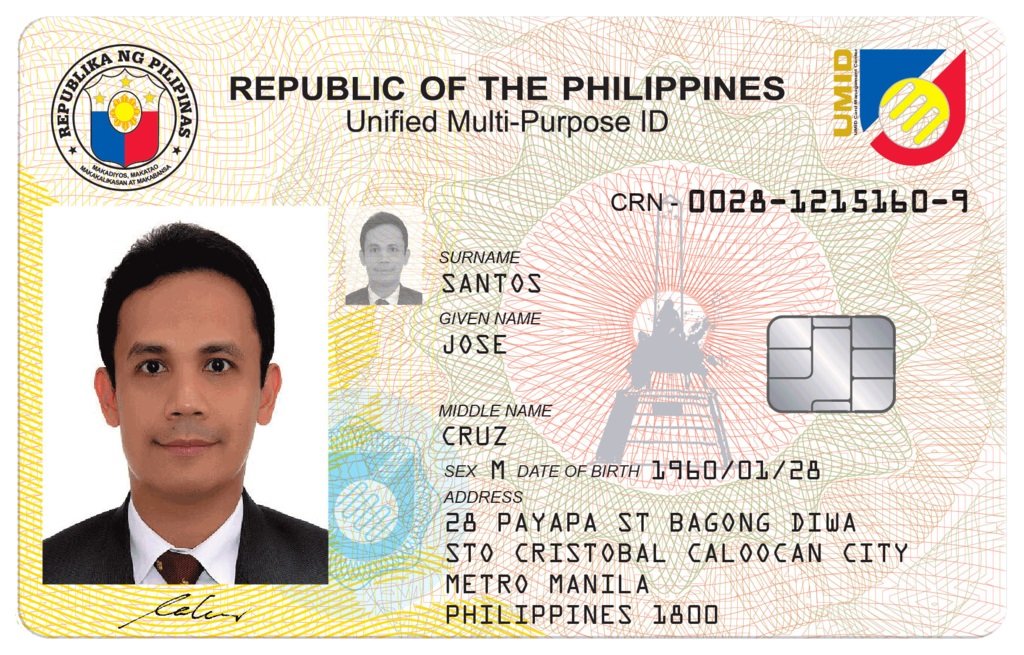
What is SSS ID (UMID Card)?
The UMID card works as your permanent SSS identification card. It gives you easy access to services like benefits, records, loans, and branch transactions.
| Advantage | Description |
|---|---|
| FREE | No fee for first-time issuance |
| Government Accepted | Valid for banks and offices |
| Durable | Plastic, long-lasting |
| Multi-Agency | Works for SSS, GSIS, PhilHealth, Pag-IBIG |
SSS ID Requirements for New Members
Below is the updated list. Keep everything prepared before booking an appointment.
| ID Type | Notes |
|---|---|
| Passport | Valid |
| Driver’s License | Plastic or paper |
| Postal ID | New version |
| PRC License | Valid |
| Voter’s ID | Accepted |
| PhilID (National ID) | Accepted |
Secondary IDs (Bring Two if No Primary)
| ID Type | Notes |
|---|---|
| Birth Certificate | PSA |
| Marriage Certificate | PSA |
| School ID | Current |
| TIN ID | Accepted |
| Company ID | Must have signature and photo |
UMID Application Documents
| Document | Purpose |
|---|---|
| UMID Form | Main application |
| Appointment Slip | Required for branch entry |
| Photocopy of ID | Backup file |
| SSS Number | Needed for registration |
Step-by-Step Guide on How to Get SSS ID
Below is the full roadmap from start to finish. Short, simple, and complete.
Step 1 — Register Your SSS Number
If you’re a new member, secure your SSS number online or through a branch.
| What You Need | Details |
|---|---|
| Valid ID | For verification |
| For online setup | |
| Mobile Number | For OTP |
Step 2 — Prepare All Required Documents
Have your IDs, UMID form, and photocopies ready.
| Best Tip | Bring original + photocopy |
|---|
Step 3 — Book Your SSS Branch Appointment
Walk-ins are no longer guaranteed. Set your schedule through the My.SSS portal.
| Appointment Type | Notes |
|---|---|
| In-Branch | For ID capture |
| Reschedule | Allowed once |
Step 4 — Visit the Branch for Biometric Capture
This includes fingerprinting, digital photo, and signature.
| Duration | Process |
|---|---|
| 10–15 minutes | Fast and smooth |
Step 5 — Wait for Pickup or Delivery
Your UMID card is mailed to your address or picked up at the branch.
| Delivery Time | Status |
|---|---|
| 30–90 days | Standard processing |
SSS Hotline for ID & Membership Concerns
Use these for follow-ups, delivery issues, or ID status checks.
| Hotline Type | Number / Contact |
|---|---|
| Landline | (02) 1455 |
| Globe/TM | (02) 1455 |
| Smart/Sun | (02) 1455 |
| SMS | 2600 |
| member_relations@sss.gov.ph | |
| FB Page | SSS Philippines |
| Operating Hours | 24/7 for hotline |
Processing Time for SSS ID (2025 Updated)
| Process Stage | Time |
|---|---|
| Biometric Capture | Same day |
| Card Printing | 1–3 weeks |
| Delivery | 30–90 days |
| Branch Pickup | Notified via SMS |
How Much Does the SSS ID Cost?
| Type | Cost |
|---|---|
| First-Time UMID | FREE |
| Replacement (Lost) | ₱200 |
| Replacement (Change of Info) | ₱200 |
How to Replace Lost, Damaged, or Incorrect SSS ID
Short version below:
- Fill out UMID Replacement Form.
- Bring one valid ID.
- Pay the ₱200 fee.
- Update details (if needed).
- Complete biometric capture again.
Replacement Fee Table
| Reason | Cost | Notes |
|---|---|---|
| Lost | ₱200 | Valid ID required |
| Damaged | ₱200 | Bring damaged card |
| Change Name | ₱200 | Bring legal documents |
Common Problems & Fast Solutions
| Issue | Quick Fix |
|---|---|
| No delivery update | Call 1455 |
| Wrong details printed | Visit the branch |
| No appointment slots | Try early morning |
| No valid ID | Bring two secondary IDs |
SSS Online Services to Activate After Getting Your ID
| Service | Purpose |
|---|---|
| My.SSS Account | Full online access |
| Contribution Checker | Track payments |
| Loan Status | See progress |
| Salary Loan | Apply online |
| Appointment Booking | Required for visits |
Branches Where You Can Apply for SSS ID
| Branch Type | Notes |
|---|---|
| Metro Manila | Faster processing |
| Provincial | Standard queue |
| Overseas | Available in select countries |
Required Forms for SSS ID Application
| Form | Use |
|---|---|
| UMID Form | Main application |
| E6 | Older version, still used |
| Appointment Slip | Required at entrance |
| Update Form | For name or detail changes |
You now have the full guide for How to Get SSS ID, including steps, requirements, hotline numbers, fees, and processing tips. Everything you need is already here — clear, direct, and easy to follow. Whether you’re a new member or replacing your card, this roadmap gives you a smooth path from start to finish.
FAQs
1. How long does it take to get my SSS ID?
Around 30–90 days.
2. Can I apply without an appointment?
Slots vary; appointment is the safest option.
3. Can students apply for SSS ID?
Yes, as long as you have an SSS number.
4. Is SSS ID the same as UMID?
Yes, UMID is the updated SSS ID.
5. What if I typed the wrong details?
Visit the branch and fill out an update form.